
CASIO PL-40R USB MIDI Device Driver v.1.2, v.1.00.00.0003, v.1.00.00.0004 Windows XP, Windows Vista, Windows 7, Windows 8.1
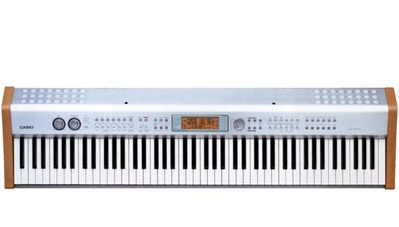
CASIO, known worldwide for many years, has introduced a useful driver for its devices. The latest update of this software was made on February 24, 2012. You can be sure that this driver is compatible with operating systems such as Windows XP, Windows Vista, Windows 7, and Windows 8.1. On our website, you can download the official CASIO PL-40R USB MIDI Device Driver for free, and its size is only 0.06 MB. After the download is complete, install it by simply clicking the downloaded file. If you encounter difficulties setting up the equipment despite using the provided drivers, feel free to leave a comment — we will be happy to help you. All files we provide for download are thoroughly checked for viruses, so their use is absolutely safe for your computer. If any errors appear, try to take screenshots of them so that we can provide more accurate assistance.
Q&A
When was the driver for CASIO devices last updated?
The official update of the driver for the CASIO device took place on February 24, 2012.
Which operating systems is the CASIO PL-40R USB MIDI Device driver suitable for?
This driver is compatible with Windows XP, Windows Vista, Windows 7, and Windows 8.1.
Where can I download the CASIO PL-40R USB MIDI Device driver?
You can download the official driver for free from our website; it is small in size – only 0.06 mb.
How do I install the driver on my computer?
After downloading the driver, you need to open the downloaded installation file and follow the installation instructions on your PC.
What should I do if the equipment setup was unsuccessful?
If you encounter problems with setup, leave a comment, and we will try to help you solve your problem.
How safe are the files for download from your website?
All files have been manually checked for viruses, so they are absolutely safe for your computer.
What should I do if an error occurs during installation?
If an error appears, please take a screenshot and send it; this will help us better understand the situation and provide more accurate assistance.
Download:
Digital Keyboards/ Pianos (excluding PL-40R):
ccmid12e.exe – Windows XP 32 bits (0.06 mb) v.1.2 (1.00.00.0003) – 01.10.2004 PID 6802
CCMID12_INST.zip – Windows 7/Vista/8/8.1 32 bits v.1.2 (1.00.00.0003) – 01.10.2004 PID 6802
Key Lighting Digital Piano PL-40R USB Driver:
pl40r12e.exe – Windows XP 32 bits (0.06 mb) v.1.2 (1.00.00.0003) – 01.10.2004 PID 6801
PL40R12_INST.zip – Windows 7/Vista/8/8.1 32 bits v.1.2 (1.00.00.0003) – 01.10.2004 PID 6801
Digital Keyboards/ Pianos/ Key Lighting Digital Piano PL-40R:
CCUSBX64_INST.zip – Windows 7/Vista/8/8.1 64 bits v.1.2 (1.00.00.0004) – 24.02.2012 PID 6801/6802