
Realtek RTL8852BE/8852AE/8852CE, Wireless LAN Driver v.6001.16.150.0 Windows 10, Windows 11
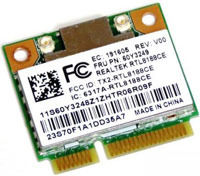
Realtek, a company known worldwide for many years, continues to delight users with its updates. The latest official driver release is dated January 15, 2024. You can be sure that this driver is an excellent fit for Windows 10 and Windows 11 operating systems. On our website, you can find the official driver for Realtek RTL8852BE/8852AE/8852CE, Wireless LAN Driver, which you can download completely free of charge. The file size is only 4.45 MB. After downloading, simply double-click the installation file to begin the installation process on your computer. If you encounter any difficulties setting up the hardware, feel free to let us know in the comments — we will be happy to help you. All files we provide for download undergo thorough virus checks and are absolutely safe for your device. If any errors occur, be sure to take screenshots so that we can better understand the problem and suggest precise solutions.
Q&A
What is Realtek?
Realtek is an internationally known company engaged in the production of semiconductors and other technologies, especially in the field of networking and audio equipment.
When was the last Realtek driver update?
The last official Realtek driver update took place on January 15, 2024.
Which driver is available for download on your website?
On our website, you can download the official Realtek RTL8852BE/8852AE/8852CE wireless driver.
What is the driver size?
The driver size is 4.45 MB, which makes it quick and convenient to download.
How do I install the driver on my computer?
First download the driver, then double-click the installation file and follow the on-screen instructions to complete the installation.
What should I do if the driver does not work?
If you have problems setting up the hardware, leave a comment with your question, and we will try to help you.
How do you ensure the safety of downloaded files?
All files offered for download are manually checked for viruses, which guarantees their safety for users and their computers.
Why is it important to take screenshots of errors?
Screenshots of errors will help us understand your situation in more detail and provide more accurate and faster assistance in solving the problem.
Download: