
OMICOM S2 PCI v.1.3.0525.0, v.1.3.0404.0 Windows XP, Windows Vista, Windows 7
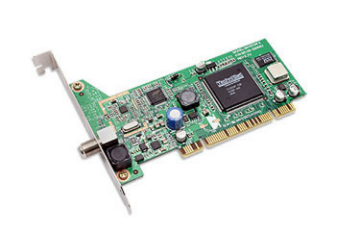
OMICOM, known worldwide for many years, offers its users up-to-date solutions. We would like to note that the latest official driver release is dated May 25, 2012. You can be sure of the compatibility of this driver with Windows XP, Windows Vista, and Windows 7 operating systems. On our website you will find the original OMICOM S2 PCI driver, available for free download. The file size is only 0.11 MB. After downloading, simply double-click the installation file to begin installing it on your computer. If you have any difficulties setting up the hardware despite using our drivers, leave a comment — we will be happy to help you. All files we provide undergo thorough virus checks and are completely safe for your device. Also, if you encounter any errors, do not forget to take screenshots so that we can diagnose the problem more accurately and provide the necessary support.
Q&A
When was OMICOM founded and what are its achievements in driver development?
OMICOM, known worldwide, has existed for many years. The latest driver update took place on May 25, 2012. The drivers from this company connect easily to Windows XP, Vista, and 7 systems.
Where can I download the OMICOM S2 PCI driver?
The official OMICOM S2 PCI driver is available for free download on our website. Its size is only 0.11 MB.
What should I do after downloading the driver?
After the download is complete, you need to find the installation file and run it to install the driver on your computer.
What should I do if installing the driver did not solve the hardware problem?
If you were unable to configure the hardware using our drivers, please write about it in the comments. We are ready to help you resolve the difficulties you encountered.
What are the safety measures when downloading files from our website?
All files you can download from our website undergo thorough virus checks, so they are completely safe for your computer.
Why are screenshots of errors needed when asking for help?
If you encounter errors, be sure to take screenshots of them. This will help us understand your situation more quickly and accurately and provide the necessary help.
Download:
omicom-bda-v1_3_525_0.zip – (0.11 mb) v.1.3.0525.0 – 25.05.2012
omicom-bda-v1_3_404_0.zip – (0.11 mb) v.1.3.0404.0 – 04.04.2012
omicom-bda-v1_1_525_0.zip – (0.17 mb) v.1.1.0525.0 – 25.05.2010