
MediaTek MT7921 Wi-Fi 6/6E Wireless LAN Driver v.3.03.00.0918 Windows 10, Windows 11
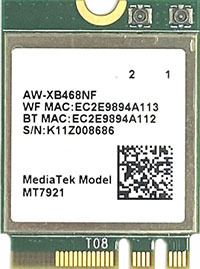
MediaTek has been known worldwide for many years. It is worth noting that the latest driver update was released on December 15, 2023. You can be sure that this driver is compatible with Windows 10 and Windows 11 operating systems. On our website, the official MediaTek MT7921 Wi-Fi 6/6E wireless LAN driver is available for free download. The file size is only 16.5 MB. After downloading, simply double-click the installation file to install the driver on your computer. If you are unable to configure the hardware using our drivers, please leave a comment, and we will try to help you. All files we provide are thoroughly checked for viruses, so you can safely use them without worrying about the security of your device. If any errors occur, be sure to take screenshots so that we can provide more accurate support.
Q&A
What is known about MediaTek and the latest driver update?
MediaTek, a company with strong international recognition, has been known for many years. The latest version of the driver was officially updated on December 15, 2023. This driver is compatible with Windows 10 and Windows 11 operating systems.
Where can I download the MediaTek MT7921 driver?
You can easily download the official MediaTek MT7921 Wi-Fi 6/6E Wireless LAN Driver for free from our website. Please note that the file size is only 16.5 MB.
How do I install the downloaded driver on my computer?
After you download the driver, simply double-click the installation file and follow the instructions to install it on your PC.
What should I do if there are problems installing the driver?
If you were unable to configure the hardware even with the provided drivers, feel free to leave a comment under our post — we will definitely help you solve the problem.
Are these files safe to download?
All our files are manually checked for viruses, which guarantees their complete safety for your computer and personal data.
What information should I provide if an error occurs?
If you encounter errors, be sure to take screenshots so that we can better understand your situation and provide more effective assistance.
Download: